Built for administrators who manage exposed Windows VPS, MU Online servers, private game servers, web panels, databases and remote access services. Ermes Server Guard monitors suspicious traffic, scores threats, blocks hostile IPs, detects RDP brute-force attempts, scans web logs, watches critical files and sends alerts before small signals become real incidents.
Free mode keeps manual firewall blocking available. Trial and Pro unlock automatic Security Events, threat scoring and active response modules.
Pro Trial available before choosing a paid license.
Background protection with GUI and service-oriented workflow.
Country visibility and country-based blocking tools.
Block history, security events and exportable reports.
Public Windows servers receive scans, repeated login attempts, web probes, connection bursts and suspicious activity from many sources. Ermes Server Guard turns those signals into clear operator actions: observe, score, alert, block, audit and report.
Tracks live connections, rapid growth, UDP spikes, inbound pressure and repeated offenders using configurable thresholds.
Applies manual and automatic blocks through Windows Firewall with audit-friendly reasons and history.
Reads Windows Security Events to detect failed-login patterns, brute-force attempts and password spraying.
Analyzes common web server logs for scans, probes and suspicious requests against sensitive paths.
This page is optimized for the real problems administrators search for: suspicious IPs, RDP brute-force attempts, anti-flood response, firewall automation and Windows server monitoring.
Monitor exposed Windows VPS connections, detect repeated offenders and apply local firewall blocks before suspicious traffic becomes operational noise.
Protect MU Online and private game server environments with profiles for game ports, repeated IP activity and aggressive unwanted connection patterns.
Use Windows Security Events to identify repeated failed login attempts, password spraying and brute-force behavior against remote desktop access.
Watch web logs, database ports and sensitive service exposure with alerts, history and firewall actions for better server control.
Configure your profile once, then monitor, block, alert and audit from one control panel.
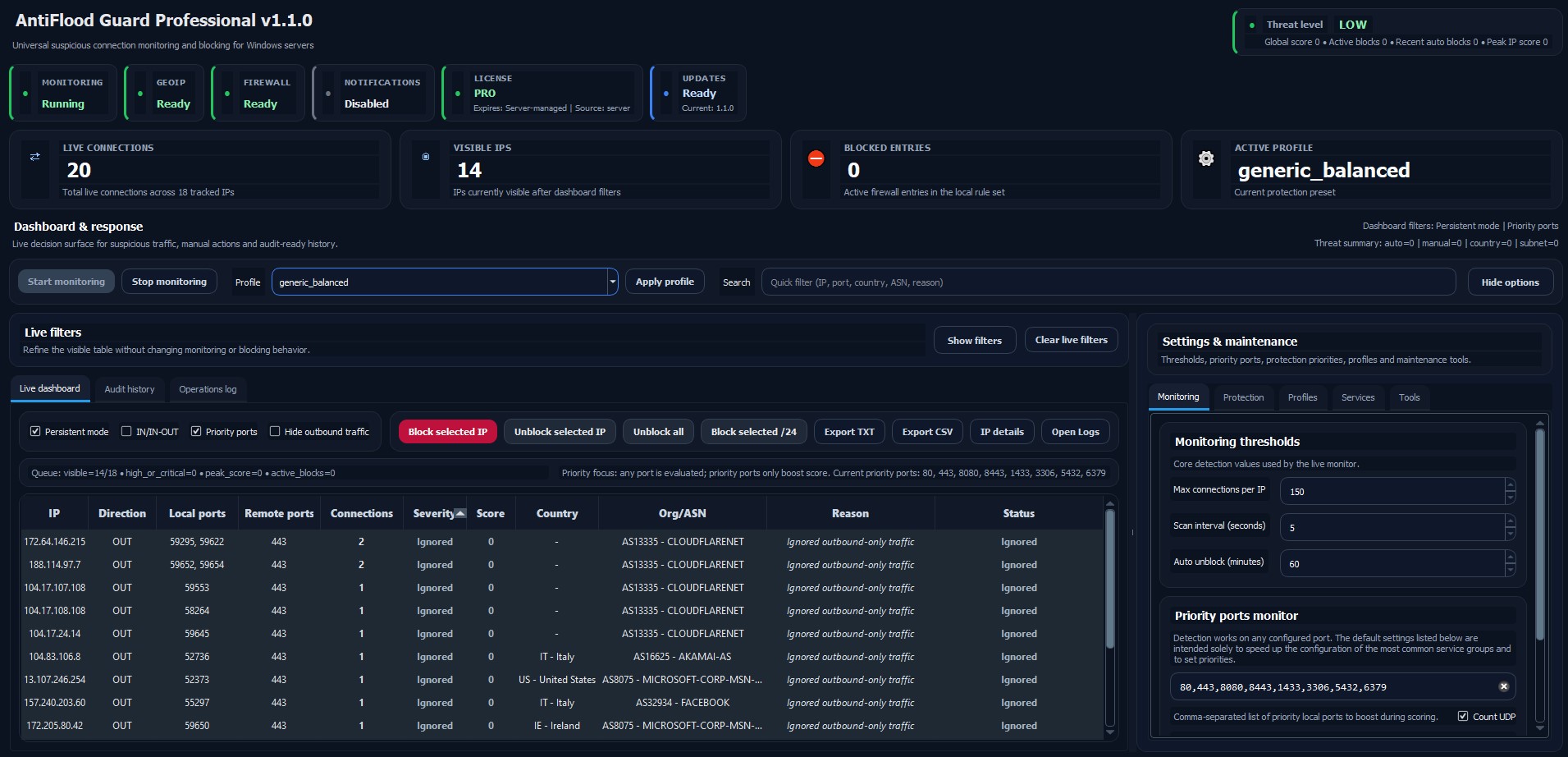
Monitor live connections, visible IPs, blocked entries, active profile, threat indicator and current protection state.
Combines multiple signals such as rapid connection growth, repeated attempts, high-risk events and critical activity.
Promotes protection to subnet level only when multiple confirmed attackers indicate a coordinated source.
Resolve countries, review sources and enforce country-based rules when your server policy requires them.
Watch critical paths such as web roots, game-server folders and configuration files for creation, modification or deletion.
Notify administrators when automatic blocks, firewall errors, web attacks or critical security events occur.
Install Ermes Server Guard on the Windows server and configure the first profile for your environment.
Select monitored ports and profiles for web services, RDP, databases, game servers or mixed environments.
Use the dashboard to view traffic, risk level, GeoIP data, history and security events.
Apply manual blocks, enable automatic response in Trial/Pro, notify admins and export reports when needed.
Profiles tune ports and thresholds without exposing internal logic or licensing controls on the public page.
This makes the value proposition clear: Free is useful for manual blocking; Trial and Pro are for automated security operations.
| Capability | Free Mode Manual control |
Pro Trial 14 days |
Pro License Full protection |
|---|---|---|---|
| Manual IP blocking | |||
| Base live monitoring | Limited | ||
| Automatic firewall blocking | |||
| Security Events and Threat Engine | |||
| RDP / Windows Event detection | |||
| Web Attack Detector | |||
| File Integrity Monitor | |||
| GeoIP and full history | |||
| Advanced profiles and report export | Basic | ||
| Discord notifications and update service | Desktop alerts |
Ermes Server Guard is presented as a practical Windows server protection layer: it helps administrators monitor, block, audit and respond to suspicious activity without promising impossible protection against every attack type.
Request Setup SupportUsers can start with manual firewall blocking before activating Trial or Pro automation features.
The trial lets administrators test automated threat scoring, security events and active response modules.
The guide explains setup, profiles, monitored services and recommended operating practices.
Security events, block history, reports and notifications support review and incident follow-up.
Ermes Server Guard helps monitor and respond directly on your Windows server. Very large volumetric DDoS attacks should also be handled with provider-level or upstream anti-DDoS protection.
Answers to frequently asked questions. If you have any further questions, please contact us and we’ll be happy to help.
Download Ermes Server Guard, start the 14-day Pro Trial and configure the protection profile that matches your server.